Letting the Agent Create Documents
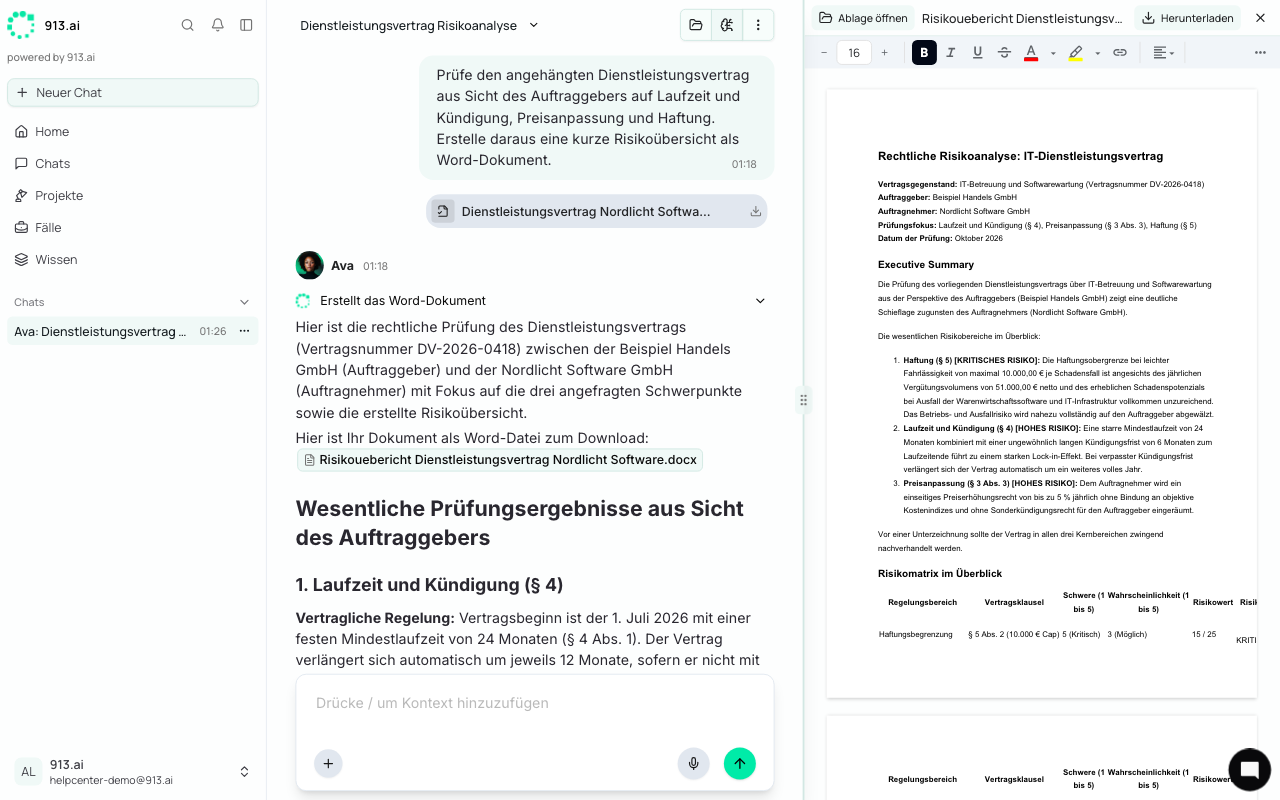
The agent creates your documents directly in their final format, for example a letter as a Word file or an analysis as an Excel spreadsheet. You no longer need to copy a draft into a document first. Instead, you get a file right away that you can open, edit, download, and reuse.
How to request a document
Say what you need and attach the relevant files. A few everyday examples:
Based on the attached documents, write a reply letter to the customer. Confirm receipt and request the missing proof by November 15.
Review the contract and create a Word document that summarizes the key clauses with a risk assessment.
Analyze the cost overview: variance per department against the budget, as an Excel spreadsheet with a totals row.
Summarize the invoices from the CSV export by supplier and highlight the open items.
You don't need to specify a format. The agent picks the right one: Word for letters and reports, Excel for tables and calculations, and PDF on request. It only creates Markdown if you explicitly ask for it.
Where to find the result
The reply shows the file name as a link. Click it, and the file opens to the right of the chat.
The file is also added to the top of the file panel under Results.
The agent shows charts and images directly in its reply. Click one to enlarge it.
Revising the result
You have three options:
Option | When to use it | Result |
|---|---|---|
Edit it yourself (Editing Word and Excel Files) | Small fixes like a typo, a date, or an amount | The file is overwritten. |
Comment (Commenting and Requesting Revisions) | Changes to specific passages | New file, e.g. |
Describe it in the chat | Overall changes (“shorter”, “more formal”, “in German”) | New file, e.g. |
The agent never overwrites an existing file. Each revision gets the next number, so you can always go back to an earlier version.
Templates and house style
If your team has set up its own templates, for example with a letterhead or standard text blocks, the agent uses them automatically. Want to set up a template? Reach out to your dedicated contact at 913.ai.
Emails stay in the chat
The agent still writes emails and message text for copying directly in the chat, not as a file. It only creates files for documents such as letters, reports, contracts, and spreadsheets.